Dental Website Accessibility: How Inclusive Design Helps More Patients Find, Understand, and Contact Your Practice
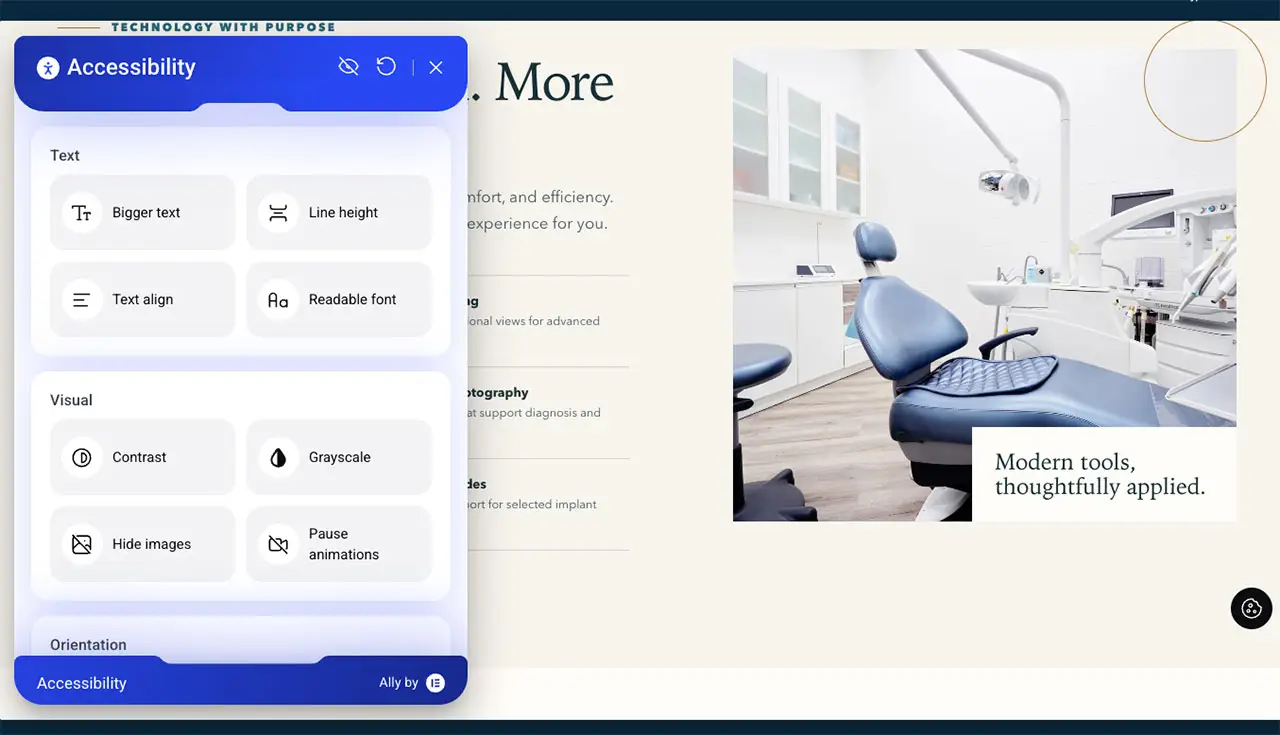
A dental website should make it easy for prospective patients to learn about the practice, understand their options, and take the next step. Dental website accessibility focuses on reducing barriers that can make those seemingly simple tasks harder for people with different visual, hearing, motor, cognitive, language, or technology needs.
A thoughtfully designed custom dental website should do more than look polished. It should communicate clearly, work across devices, organize information logically, and make important actions such as calling the practice or requesting an appointment easy to find and use.
Accessibility supports all of those goals. It encourages practices to think beyond how a website looks on one screen and consider how different people actually interact with the content.
For dental practices, this is especially important because the website may be a patient's first meaningful interaction with the office. If that experience feels confusing, difficult to navigate, or impossible to use with the patient's technology, the person may never reach the point of calling or scheduling.
What Is Dental Website Accessibility?
Dental website accessibility is the practice of designing and maintaining a website so that people with a wide range of abilities and circumstances can access information and complete important tasks.
Accessibility can affect people who:
- Have low vision or difficulty distinguishing certain visual elements
- Use screen readers or other assistive technology
- Navigate using a keyboard instead of a mouse
- Have difficulty hearing audio content
- Experience cognitive or reading challenges
- Use mobile devices with small screens
- Have temporary limitations, such as an injured hand
- Use slower internet connections
- Prefer clearer, simpler language
In other words, accessibility is not a single feature or plugin. It is a way of thinking about the complete website experience.
Why Accessibility Matters for Dental Practices
A dental practice website often asks visitors to complete several important tasks.
They may need to:
- Find the office phone number
- Learn whether a service is offered
- Understand what a treatment involves
- Locate the practice
- Read insurance or payment information
- Meet the dentist virtually
- Complete an appointment form
- Choose the correct office location
If one of those actions is unnecessarily difficult, the website creates friction between patient interest and patient care.
Accessible design helps make those paths clearer for more people. At the same time, many accessibility improvements also benefit the general patient population.
Clear headings, readable text, descriptive links, simple forms, organized navigation, and understandable language are useful whether or not someone uses assistive technology.
1. Use a Logical Heading Structure
Headings should do more than make text look larger. They create structure.
A clear page generally begins with one primary H1 heading describing the main topic. H2 headings can divide that topic into major sections, while H3 headings can organize information within those sections.
This structure helps visual readers scan the page quickly. It can also help assistive technologies interpret the relationship between different parts of the content.
For example, a dental implant page might be structured around sections such as:
- What Are Dental Implants?
- Who May Consider Dental Implants?
- What Happens During the Process?
- Dental Implant Options
- Frequently Asked Questions
- Schedule a Consultation
That is easier to understand than a long page of visually styled paragraphs without a meaningful hierarchy.
2. Make Text Easy to Read
Patients should not need to strain to read service information.
Readable website typography considers:
- Font size
- Line spacing
- Paragraph length
- Contrast between text and background
- Spacing around headings
- Mobile readability
Long, dense paragraphs can make dental information feel more complicated than necessary. Breaking content into shorter sections, lists, and clearly labeled topics helps people process information more easily.
This is particularly useful for treatment pages where patients may already feel uncertain or overwhelmed.
3. Use Strong Color Contrast
A visually attractive color palette is valuable, but design choices should not make important text difficult to see.
Light gray text on a white background may look elegant in a design mockup, but it can be difficult for some users to read.
The same principle applies to buttons and form fields. A patient should be able to distinguish interactive elements from the surrounding page.
Contrast is particularly important for:
- Body copy
- Navigation
- Buttons
- Appointment links
- Form labels
- Error messages
- Contact information
Brand design and readability do not need to compete. A thoughtful design system can support both.
4. Add Meaningful Alternative Text to Important Images
Alternative text, commonly called alt text, helps communicate the purpose of an image when the visual itself cannot be interpreted by the user.
Useful alt text should describe relevant information without stuffing keywords or repeating unnecessary details.
For example, an image of the dentist speaking with a patient might use alt text such as:
Dentist discussing treatment options with a patient in a consultation room
Decorative images may not need a detailed description, while informative graphics may require enough text to explain their purpose.
The goal is usefulness, not SEO keyword repetition.
5. Do Not Rely on Images to Communicate Essential Text
Dental websites sometimes place important information directly inside promotional graphics.
For example, an image may display:
"Now Accepting New Patients, Call Today."
If that information exists only as part of an image, some users and technologies may not receive the message clearly.
Essential information should also appear as actual text on the page.
This makes the content easier to read, resize, search, translate, and interpret.
6. Make Navigation Work Predictably
A patient should not have to solve a puzzle to find the services menu or contact page.
Accessible navigation is typically:
- Consistent from page to page
- Clearly labeled
- Usable without precise mouse movements
- Easy to understand on mobile devices
- Organized around patient needs
Creative website design can still be distinctive, but originality should not come at the expense of usability.
Patients are usually more interested in finding the information they need than learning how an unusual navigation system works.
7. Make Buttons and Links Descriptive
Buttons should explain what will happen when someone selects them.
Instead of vague wording such as:
Click Here
use specific actions such as:
- Request an Appointment
- Meet Our Dentists
- Explore Dental Implant Options
- View Our Locations
- Call the Practice
Descriptive link text provides better context to every visitor and can be especially useful when someone navigates a page using assistive technology.
8. Design Forms for Real People
Appointment forms are a critical part of many dental websites, yet they can easily become a barrier.
Accessible forms should make it clear:
- What information is being requested
- Which fields are required
- What format is expected
- Whether an error occurred
- How to correct the error
- What happens after submission
Labels should remain clear even after someone begins typing.
Error messages should also explain the problem. A red outline alone may not tell every user what needs to be corrected.
Keeping initial appointment forms relatively short can also reduce friction.
9. Make the Website Usable With a Keyboard
Not everyone interacts with websites using a mouse or touchscreen.
Some people use a keyboard to move through navigation, links, buttons, and forms.
An accessible website should allow important interactive elements to be reached and used through keyboard controls in a logical sequence.
Visitors should also be able to see which element currently has focus.
If keyboard navigation becomes trapped inside a menu, popup, or form, completing basic tasks can become difficult or impossible.
10. Add Captions or Text Support for Video Content
Video can be an excellent tool for dental practices.
Dentists can use video to:
- Introduce the team
- Explain treatment options
- Answer common questions
- Show the practice environment
- Discuss the consultation process
However, important spoken information should not depend entirely on audio.
Captions can make videos more useful for people who are deaf or hard of hearing. They also help people who are watching without sound, which is common on mobile devices.
For especially important educational content, providing useful written information on the page can reinforce the video's message.
11. Keep Website Language Clear
Accessibility is not limited to code and visual design.
The words themselves matter.
Dental terminology can be unfamiliar to patients. A website filled with technical language may be accurate while still being difficult to understand.
When possible, explain clinical terms in patient-friendly language.
For example, instead of assuming every visitor understands "edentulism," a page may simply discuss "missing teeth."
Instead of relying only on the term "endodontic treatment," a page can explain that root canal treatment is used to address problems inside a tooth.
Clear language supports informed conversations without talking down to patients.
12. Consider Multilingual Patient Experiences
Some dental practices serve communities where patients speak more than one primary language.
In those markets, language access can become an important part of website usability.
A multilingual experience should be planned thoughtfully rather than simply duplicating random portions of the site.
Important considerations include:
- Which languages reflect the actual patient community
- Whether important service information is consistently translated
- Whether navigation remains clear in each language
- Whether appointment actions work properly
- Whether updates are maintained across language versions
Energize Group's dental website gallery includes examples of practice-specific website experiences, including bilingual and multi-location builds designed around the needs of different markets.
13. Make Mobile Accessibility Part of the Plan
Mobile usability and accessibility frequently overlap.
A patient using a smartphone may benefit from:
- Large tap targets
- Readable text without zooming
- Simple navigation
- Click-to-call phone numbers
- Forms designed for smaller screens
- Reasonable spacing between buttons
- Content that remains readable in portrait orientation
These improvements can be especially important for someone trying to find a dentist quickly.
An emergency patient should not need to pinch and zoom simply to locate the phone number.
14. Avoid Popups That Block Important Information
Popups can be useful in certain situations, but poorly designed overlays can make websites difficult to use.
Common problems include:
- Close buttons that are too small
- Popups that cover the entire mobile screen
- Repeated offers that interrupt reading
- Keyboard focus becoming trapped
- Important content becoming inaccessible behind the overlay
Before adding a popup, consider whether it genuinely helps the patient complete a useful action.
A clear appointment button may be more effective than repeatedly interrupting the visitor.
15. Test Accessibility as the Website Changes
Accessibility is not finished when a website launches.
New pages, plugins, forms, videos, images, and design updates can introduce new barriers.
Ongoing review can evaluate:
- Navigation
- Keyboard usability
- Form behavior
- Contrast
- Alt text
- Heading structure
- Video support
- Mobile usability
- Broken links
- New page templates
Automated testing tools can identify certain technical issues, but they cannot always determine whether the overall patient experience makes sense. Human review remains valuable.
Benefits of Dental Website Accessibility
Dental website accessibility supports more than compliance-minded website development. Many accessibility improvements directly strengthen patient communication and digital usability.
- Easier navigation: Clear menus, headings, and page structures help more patients find relevant information.
- Improved readability: Strong contrast, usable text sizes, and shorter content sections reduce visual and cognitive friction.
- Better mobile experiences: Accessible controls and responsive layouts make it easier to interact with the website from smartphones and tablets.
- Clearer appointment paths: Descriptive buttons and well-designed forms help patients understand how to contact the practice.
- Stronger video usability: Captions and supporting text allow educational content to work in more situations.
- More inclusive communication: Thoughtful design can support people with different visual, hearing, motor, cognitive, language, and technology needs.
- Better content organization: Logical headings and page hierarchy make treatment information easier to scan and understand.
- A stronger patient experience: Removing digital barriers can help more prospective patients move confidently from research to contact.
Accessibility and Conversion Optimization Can Support Each Other
Accessibility and conversion rate optimization are not the same discipline, but many improvements support both.
Consider a few examples.
A larger, clearly labeled appointment button can be easier for someone with limited dexterity to use. It can also make the scheduling action more visible to every mobile visitor.
A clear H1 and organized H2 headings can improve structural accessibility. They also help prospective patients scan the page and find the information most relevant to their decision.
Shorter forms can reduce unnecessary complexity for users with cognitive or motor limitations. They can also reduce abandonment among general website visitors.
Captions support people who cannot hear the audio. They also benefit patients watching videos in a waiting room, at work, or anywhere sound is inconvenient.
Good accessibility frequently looks like good user experience because both begin with the same question: how can we make this easier for the person using the website?
Accessibility and SEO Also Have Shared Foundations
Accessibility should not be treated as an SEO tactic. However, several practices that improve accessibility also create cleaner, more understandable website structures.
These may include:
- Logical headings
- Descriptive page titles
- Meaningful link text
- Useful image descriptions
- Clear page structure
- Fast mobile performance
- Text-based treatment information
A website built around clarity is easier for patients to understand and easier for search systems to interpret.
The priority should remain creating useful, accessible content for people. Strong technical organization can then support broader digital visibility.
Accessibility Should Reflect the Actual Practice
A strong dental website should not feel like a generic accessibility checklist applied to a generic template.
The experience still needs to represent the practice's brand, market, services, patients, and personality.
A pediatric dental practice may need different visual and content decisions from an implant-focused practice. A bilingual community practice may need a different content structure from a boutique cosmetic office. A multi-location practice may need especially clear location routing.
Accessibility works best when it is built into those decisions rather than added as an afterthought.
Frequently Asked Questions About Dental Website Accessibility
What does dental website accessibility mean?
Dental website accessibility means designing and maintaining a practice website so that people with different visual, hearing, motor, cognitive, language, and technology needs can more easily access information and complete important actions.
Is website accessibility only for people with permanent disabilities?
No. Accessible design can also help people with temporary limitations, older adults, mobile users, people using slow connections, patients watching videos without sound, and anyone who benefits from clearer website organization.
What are some important accessibility features for a dental website?
Important considerations can include readable text, strong contrast, logical heading structure, alternative text for meaningful images, keyboard navigation, descriptive links, accessible forms, video captions, and mobile-friendly controls.
Can dental website accessibility improve patient experience?
Yes. Many accessibility improvements reduce friction for all visitors. Clearer navigation, easier forms, readable content, captions, and obvious appointment options can make the website simpler for more people to use.
Should dental website accessibility be reviewed after launch?
Yes. Websites change over time. New pages, forms, plugins, videos, images, and design updates can introduce new accessibility issues, so periodic review is valuable.
Does an accessibility plugin make a dental website fully accessible?
A plugin or automated tool may help identify or address certain issues, but accessibility involves website structure, design, content, forms, navigation, media, and human usability. It should be considered across the full website experience.
Make Every Patient's Digital Path Easier
The best dental websites do not force patients to adapt to the design. They make information easier to find, treatment options easier to understand, and the next action easier to complete.
Dental website accessibility supports that goal by encouraging practices to consider how real people experience every part of the site, from reading a service page to navigating on a phone, watching a video, completing a form, or finding the office number.
Accessibility is ultimately about reducing unnecessary barriers. When that principle is built into the website from the beginning, it can support patient trust, usability, communication, and a stronger digital experience for a wider range of prospective patients.
If your practice wants a custom website built around your brand, patient experience, services, market, and clear appointment paths, contact Energize Group at 910-857-5874 to Schedule a Consultation and explore a custom dental website strategy.
Keep reading
Related Insights.

Dental Website Conversion Rate Optimization: 15 Small Fixes That Turn Traffic into Calls
A dental website can look polished, rank well, and receive steady traffic while still failing to generate enough calls or appointment requests. When that happens, more traffic is…
Read article
Top Features to Have on Your Dental Practice Website
Creating a website for our dental practice is essential. It is often the first place potential patients go to learn about our services and determine if we are…
Read article
Essential Features for Dental Websites
A well-designed dental practice website is essential for attracting and retaining patients. It serves as the digital front door of our practice, offering important information and making it.
Read articleFrom insight to action
Build a Clearer Growth Plan.
Connect the idea to the right website, campaign, and patient follow-up system.
Schedule a Growth Consultation